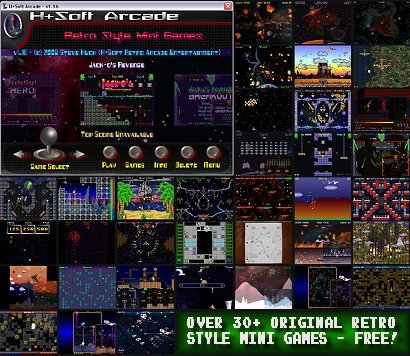
<< Welcome To HsRetroGames.Com! - Retro Style & Mini Games - Home of H+Soft Retro Arcade Entertainment &  H+Soft Arcade >> Important! >> All Games by H+Soft Retro Arcade Entertainment Require H+Soft Arcade to Run - Download it First! >> Site Navigation Info >> Get Unlimited Play of ALL H+Soft Games! - Register Your Copy of H+Soft Arcade Today for Only $9.95! - Click on REGISTER NOW for Details! >> Check Out the Entire H+Soft Arcade Game Collection - Including the Latest and User Picked Games! - Click on  H+SOFT ARCADE >> Check Out New Games in Development for H+Soft Arcade - Including Screen Shots, Development Status and Release Dates! - Click on COMING SOON >> Find Cool Stuff at Some of HsRetroGames Partner Sites - Click on LINK PARTNERS >> Have a Comment? a Question? or Need Registration Support? - Want to Sell H+Soft Arcade on Your Website as an Affiliate? - Click on CONTACT/SUPPORT >> Read About H+Soft Retro Arcade Entertainment and H+Soft Arcade - Click on the HsRetroGames.com Banner! >> 

H+Soft ArcadeRegister NowComing SoonLink PartnersContact/Support

H+Soft Arcade .....................................................................................................................................

General Info ..........................................................................................................................................

Graphics/Display:  Windowed - 640x480x16 Bit High Color w/Open GL Rendering FX

Latest Version Info: v1.3 | 8/23/08 - Misc. Improvements - Demo timer has been patched, Added top score displays and performance/speed settings - Use this new feature to adjust the arcade/game run speed. All the games for H+Soft Arcade have been recompiled and updated for this new version. Existing users will need to upgrade to v1.3, delete and re-install every game for the new performance/speed settings to take effect.

Included Game: Download Includes popular platform game Jack-o's Revenge Installed! - An evil witch has turned you into a Jack-O-Lantern! Now, you must retrieve the five magic items to reverse her evil spell!

System Requirements: Windows 98, XP, Vista (XP or Vista recommended) | 500 Mhz Processor (1.2 Ghz or better recommended) | 32 Mb Ram (64 Mb recommended) | DirectX 7.0 or Better | OpenGL Compatible Graphics Card w/Current Drivers | 32 Mb Video Memory or More For OpenGL Graphics Rendering and Effects.

Program Info: Download Size: 5 Mb | Installed Program Size:  8 Mb | Demo is a 90 Minute Trial Program/Download  size based on the size of H+Soft Arcade w/ current game installed, Over-all size will vary depending on how many games you add to the H+Soft Arcade Game Directory.

Install Info: It's recommended you don't modify the default install path of H+Soft Arcade or any of the games. H+Soft Arcade and any installed games must be in the same directory/folder. Failure to do so could result in H+Soft Arcade not finding the games you've installed. When you are ready to un-install H+Soft Arcade you must manually 'Delete' all of the games from the arcade then launch the included un-installer.

Description: Welcome to H+Soft Arcade! Now you can have your own arcade right on your home PC or laptop! With H+Soft Arcade and the click of a button you can easily Launch (play), Delete, or View Instruction pages for any H+Soft Retro or Mini Game you have Installed! With an extensive and growing library of games, H+Soft arcade places one icon on your desktop and only one program listing in your start menu allowing you to easily access, manage or play an unlimited number of games without cluttering up your computer - How awesome is that! H+Soft Arcade links directly to this web site ( H+Soft Home Page At HsRetroGames ) for game downloads! Just click on 'Games' and your there! This software uses a unique file system that reads in game folders/files right from it's own directory, thus, allowing H+Soft Arcade to access virtually an unlimited number of games! Which is good, considering new games and updates are always in development!

Try The DemoGames For H+Soft ArcadeRegistration

H+Soft Arcade Has Won Several Awards! - Be Sure To Check Out The Awards Page >>

H+Soft Arcade Info & Tips ................................................................................................................

Selecting Games: You can change the current game selection by clicking on the Joystick Selection Arrows on the Bottom Console using your mouse or the Left & Right Arrow Keys on your keyboard.

Playing Games: Click on the center screen shot or 'Play' from the Bottom Console menu using your mouse. This will launch the current game in full screen. You can also launch the current game by pressing the 'Space Bar' or the 'Enter' key. When you are ready to quit a game, you can terminate it by pressing the 'ESC' key.

Adding Games: Click on 'Games' from the Bottom Console using your mouse. You will be taken to the HsRetroGames home page ( Games Gallery ). Browse the gallery to find a game you would like to Install to the arcade. Then, click on the screen shot of the game you'd like to install, you will go to the info page for that game. Click on 'Add To H+Soft Arcade' and then 'Run' to start the download. When the Download/Install completes, run H+Soft Arcade and the game will be installed and ready to play. If you have H+Soft Arcade running, Re-Open the program and click on 'Update' from the 'Update the Game Directory Now?' prompt.  You can download several games before returning to H+Soft Arcade. If you didn't get the 'Update' prompt, you can access it later from the main menu ( click on 'Update Game Directory' ).

Game Info: Click on 'Info' from the Bottom Console using your mouse. You will be taken to the most recent tips and info ( instructions ) page for the current selected game at this website.

Deleting Games: Click on 'Delete' from the Bottom Console using your mouse. You will go to the game deletion prompt. Click on 'Delete' to remove the folder from the game directory and arcade.

High Scores: If the current game supports a high score, H+Soft Arcade displays the top score for that game below it's screen shot. To delete a top score, simply delete the game from the arcade and re-install it.

Main Menu: Click on 'Menu' from the Bottom Console using your mouse. The menu is as follows:

Return To Arcade - This exits the menu and returns you to the game selection.

Update Game Directory - This feature is used if you have recently downloaded games.

Read Instruction Manual - Takes you to this web page for latest info and version updates.

Performance/Speed Settings - Use this feature to set speed preferences for you or your system. The default setting is V-Sync @ 60 HRZ - Use this setting if your graphics card supports it. Otherwise, use one of these other settings: Slow - 30 Frames Per Second, Normal - 60 Frames Per Second or Fast - 90 Frames Per Second. These settings effect the run speed for H+Soft Arcade and all the games you have installed that don't support their own speed options.

Adjust Volume Settings - Use this option to adjust the sound or music volumes for the Arcade only. This does not effect game sound and music volume settings.

Save Settings And Quit - Click this to save all of the current settings and quit H+Soft Arcade. Terminating or closing the window ( clicking the 'X' ) has the same effect.

.................................................................................................................................................................

.................................................................................................................................................................

Recommend This SiteH+Soft Arcade Register Now Coming Soon Link Partners Contact/Support

( C ) 2006-2008 HsRetroGames.Com and H+Soft Retro Arcade Entertainment - All Rights Reserved